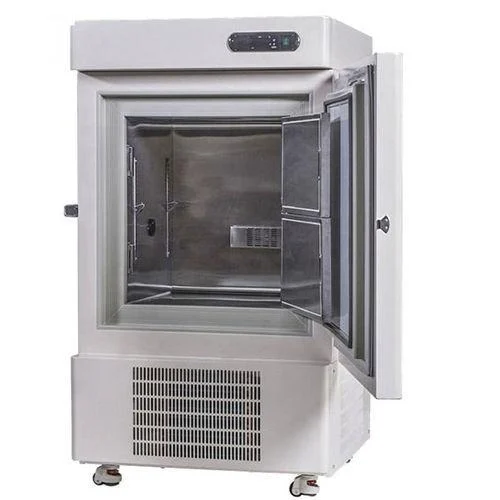
A Deep Freezer SOP establishes standardized instructions for the operation, cleaning, calibration, maintenance, and validation of deep freezer equipment used in pharmaceutical microbiology laboratories. Proper deep freezer operation and temperature monitoring are essential for maintaining the required storage conditions and protecting temperature-sensitive laboratory materials.
This Standard Operating Procedure (SOP) explains the equipment startup procedure, temperature monitoring, biometric door access, verification of sensor channels, event records, audit trails, input and output status, and alarm acknowledgement. It also covers routine cleaning, defrosting, temperature sensor calibration, and preventive maintenance.
Following an approved deep freezer SOP helps ensure consistent equipment operation, proper documentation, and effective control of laboratory storage conditions.
Note: The specified temperature limits, calibration requirements, validation criteria, and operating instructions must be followed as per the approved equipment-specific SOP and validation documents.
SOP
- PURPOSE:
To establish the procedure for the operation, cleaning, calibration, maintenance, and validation of the deep freezer.
- SCOPE:
This procedure applies to the operation, cleaning, calibration, maintenance, and validation of the deep freezer used in the Microbiology Laboratory.
- RESPONSIBILITIES / ACCOUNTABILITY:
- The Microbiologist shall be responsible for operating and cleaning the deep freezer and coordinating its periodic validation.
- The Microbiology Reviewer shall be responsible for reviewing the records related to the deep freezer.
- The Engineering Department shall be responsible for performing preventive and breakdown maintenance of the deep freezer and coordinating its periodic calibration.
- The Head of the Department or designee shall be responsible for verifying and ensuring the implementation of the SOP.
- The Head of QA or designee shall be responsible for approving the SOP and overseeing its implementation and compliance with the established procedure.
- ABBREVIATIONS:
SOP: Standard Operating Procedure
QA: Quality Assurance
MB: Microbiology
UPS: Uninterrupted Power Supply
AC: Alternating Current
IPA: Isopropyl Alcohol
PLC: Programmable Logic Controller
HMI: Human-Machine Interface
PC: Personal Computer
SP: Set Point
PV: Process Value
- DEFINITION:
Nil
- PROCEDURE:
- General precautions:
- Ensure that the equipment’s PLC/HMI remains switched ON at all times.
- Ensure that the client PC remains switched ON at all times.
- Ensure that the temperature sensors are properly positioned and do not come into contact with the stored materials.
- Operation:
- Connect the equipment PLC/HMI to the 230 V UPS power supply.
- Switch ON the main power supply to the deep freezer.
- The LED display will illuminate, showing the temperature set point (SP) in the upper section and the process value (PV) in the lower section, as illustrated in Fig. 01.
- Allow the temperature process value (PV) to reach the set point (SP), as shown in Fig. 01.
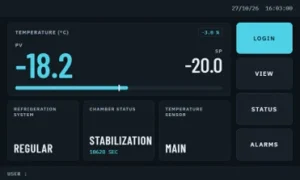
Fig 01
- Once the process value (PV) reaches the set point (SP), the deep freezer is ready for use.
- Operation of Door
- A biometric fingerprint scanner is provided at each door of the deep freezer for access, as illustrated in Fig. 02.
- Place the previously registered and validated fingerprint on the scanner to authenticate access to the deep freezer.
- Upon successful fingerprint authentication, the biometric scanner display will indicate “Access Granted,” as shown in Fig. 03.
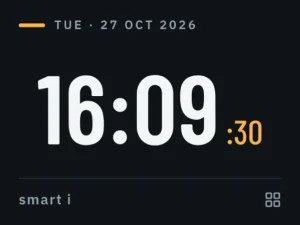
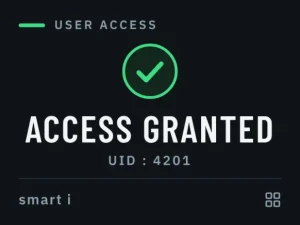
Fig 02 Fig 03
- Pull the handle located on the left side of the deep freezer to open the door, followed by opening the glass door.
- Place the required articles into the deep freezer or remove the articles as needed.
- Close both doors of the deep freezer by pushing them firmly and secure them using the side lock.
- Record the details of deep freezer usage in the logbook as per Annexure-I (Template for Usage Record of Deep Freezer).
- Verification of Channels (sensors) temperature, Events and Audit trails
- Press the ‘LOGIN’ button on the digital display, as shown in Fig. 01. The system will prompt for login credentials, as illustrated in Fig. 04 and Fig. 05.
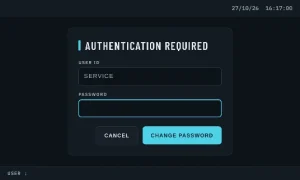
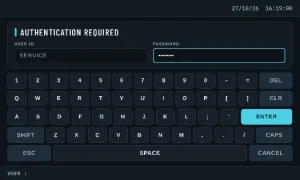
Fig 04 Fig 05
- After entering the login credentials, the corresponding screen will appear on the display.
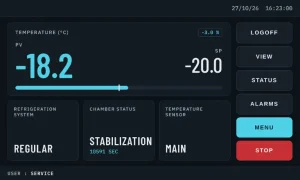
Fig 06
- Press the ‘VIEW’ button to display the temperature status of all channels (sensors).
- The temperature readings of each channel (sensor) will be displayed on the subsequent screen, as illustrated in Fig. 07.
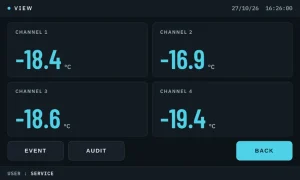
Fig 07
- To view the recorded events, press the ‘EVENT’ button on the display screen shown in Fig. 07.
- Enter the required login credentials when prompted on the display, as shown in Fig. 04 and Fig. 05.
- Upon successful login, the event list will be displayed on the screen, as shown in Fig. 08.
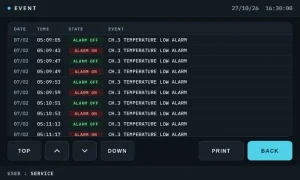
Fig 08
- Press the ‘BACK’ button to return to the screen shown in Fig. 07.
- To review the audit trail records, press the ‘AUDIT’ button on the display screen shown in Fig. 07.
- Enter the required login credentials when prompted by the system, as shown in Fig. 04 and Fig. 05.
- Upon successful login, the audit trail records will be displayed on the screen, as shown in Fig. 09.
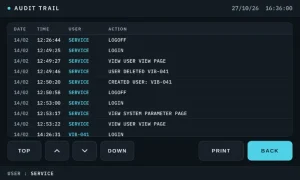
Fig 09
- Press the ‘BACK’ button to return to the display screen shown in Fig. 07.
- Press the ‘BACK’ button again to return to the screen shown in Fig. 06.
- Verification of ‘INPUT’ and ‘OUTPUT’ data
- Press the ‘STATUS’ button to view the input and output data of the deep freezer.
- The input data will be displayed on the next screen, as shown in Fig. 10
- The input data screen shows the status of the Main Contactor, Regular Refrigeration System, Standby Refrigeration System, Buzzer and Indication, and Scanner Alarm.
- Press the ‘OUTPUT’ button to view the output status of the deep freezer, as shown in Fig. 11.
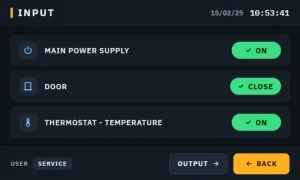
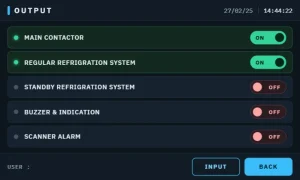
Fig 10 Fig 11
- The output screen indicates the operational status of the Main Contactor, Blower, Buzzer and Indication, and Scanner Alarm.
- Press the ‘BACK’ button to navigate to the previous screen, as shown in Fig. 06.
- Acknowledgement of alarms:
- In the event of a power failure during working or non-working hours, the ‘ALARMS’ button on the digital display will begin to blink, as shown in Fig. 12.
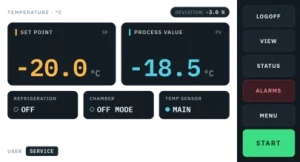
Fig 12
- Press the ‘ALARMS’ button on the digital display panel to acknowledge the alarm.
- The alarm events will be displayed on the subsequent screen, as shown in Fig. 13
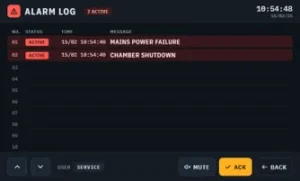
Fig 13
- In the event of a temperature excursion, the ‘ALARMS’ button on the digital display will begin blinking red, as shown in Fig. 12.
- Additionally, a continuous buzzer alarm will sound, and the LED indicator located next to the digital display will blink red, as shown in Fig. 14.
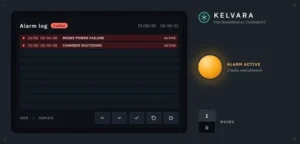
Fig 14
- To acknowledge the alarm, follow the instructions provided in Sections 6.2.9.2 and 6.2.9.3
- Press the ‘ACK’ button to acknowledge the alarm.
- Press the ‘BACK’ button to return to the screen shown in Fig. 06.
- To log out of the deep freezer system, press the ‘LOGOFF’ button, as shown in Fig. 06.
- Cleaning and De-frosting:
- Clean the external surfaces of the deep freezer daily using a lint-free duster moistened with 70% IPA.
- Clean weekly by wiping the trays of the deep freezer with scheduled disinfectant followed by 70% IPA with lint free duster.
- Document the weekly cleaning details in the logbook provided in Annexure-I (Template Logbook for Usage Record of Deep Freezer).
- Perform defrosting of the deep freezer during scheduled preventive maintenance (once every six months) or whenever required. Record the defrosting details in the logbook provided in Annexure-I (Template Logbook for Usage Record of Deep Freezer).
- During defrosting, transfer the materials to a standby or alternate deep freezer maintained at the same temperature.
- Calibration of Temperature Sensors:
- Frequency: Once in a year
- Perform periodic calibration of the temperature sensors in accordance with the Engineering Procedure for Calibration Management.
- Perform annual, protocol-based validation of the deep freezer through an approved external agency.
- Maintenance of Deep freezer:
- Perform planned preventive maintenance of the deep freezer once every six months in accordance with the Engineering General Preventive Maintenance Procedure.
- Transfer the materials to a standby or alternate deep freezer maintained at the same temperature.
- ANNEXURES:
Annexure-I: Template Logbook for Recording Deep Freezer Usage
- REFERENCES:
- ‘General Preventive Maintenance Procedure.’
- ‘Procedure for Calibration Management.’
- REVISION HISTORY:
| Revision No. | Effective date | Reason for revision |
| 00 | New SOP |
END OF DOCUMENT